
Pickup points for WooCommerce
Let customers choose a pickup point or parcel locker on a map in your checkout: 18 European carriers in 29 countries, with a separate price for each carrier.
The plugin is free. It needs a PickupSelect account, which you can create from the plugin, and there is a free plan.
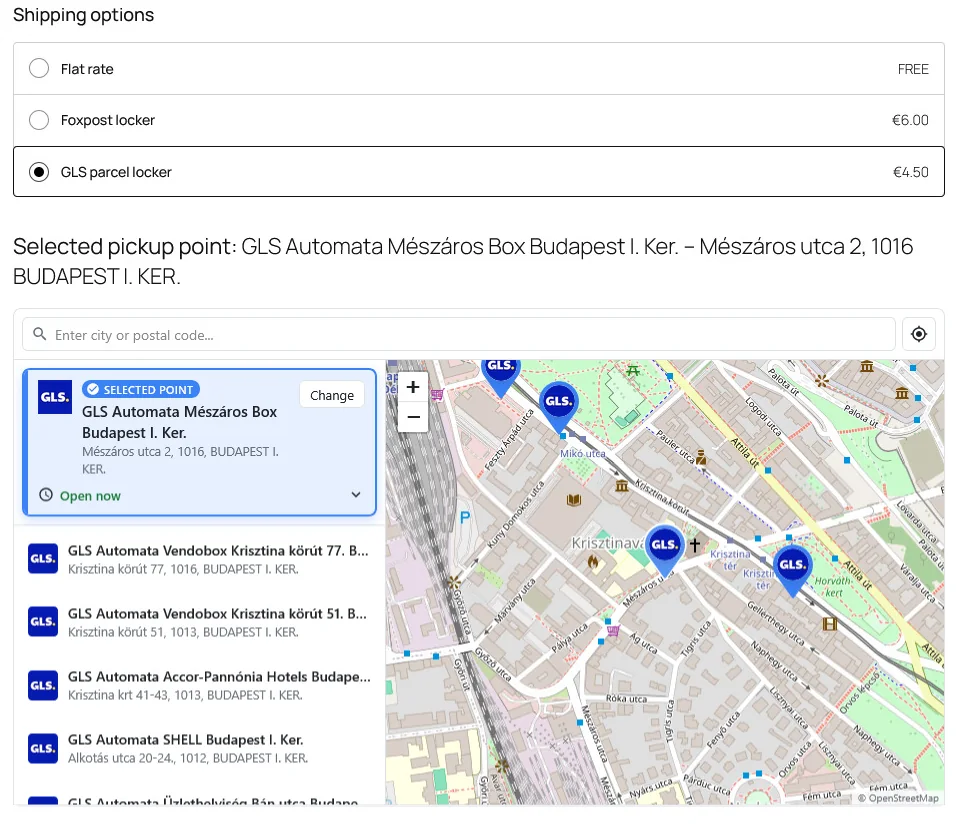
Set up in three steps
1. Install
Install PickupSelect from Plugins › Add New Plugin in WordPress and activate it.
2. Connect
Click "Connect to PickupSelect", log in or sign up, and approve the shop. There are no keys to copy.
3. Add your carriers
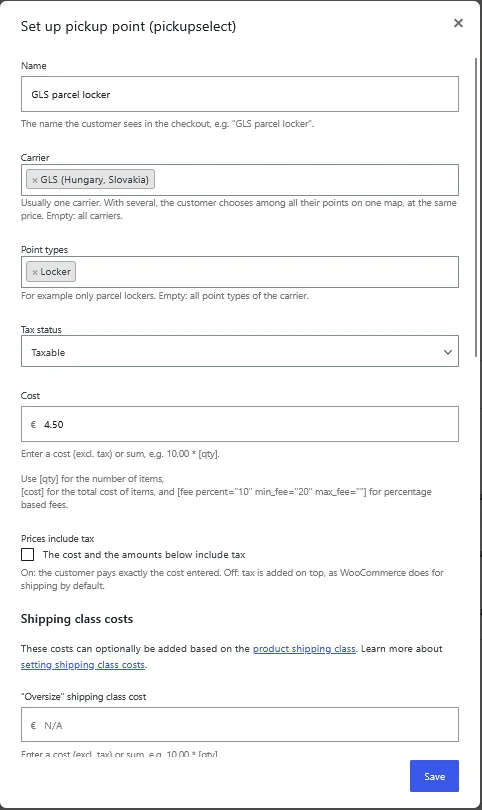
In each shipping zone, add a "Pickup point" method for every carrier you offer and set its price.
Works the way WooCommerce does
- Both checkouts. The block checkout and the classic shortcode checkout.
- One shipping method per carrier. Each has its own name, carrier, point types and price, for example only parcel lockers. Prices per country come from your shipping zones.
- Familiar pricing. Built on the WooCommerce flat rate, so costs can use its formulas and extra costs per shipping class.
- Free shipping and limits. A free-above amount, minimum and maximum order value and maximum weight for each method.
- Bulky products. Hide a method when the cart contains products that do not fit in a parcel locker.
- Checked on the server. The carrier, point type and country of the chosen point are verified, so a point of another carrier cannot be sent from the browser.
- Saved with the order. The chosen point appears in the admin and the order emails, and it can be changed on the order screen.
- Never a broken checkout. If the map cannot work, the option is hidden, customers can still order with your other methods, and the admin shows why.
Supported carriers
Every plan includes all countries and carriers. New carriers appear in the shipping method settings automatically.

Česká pošta
1 country

Correos
1 country

CTT
1 country

DHL
27 countries

DPD
28 countries

Foxpost
1 country

GLS
27 countries

Hrvatska pošta
1 country

Inpost
3 countries

Magyar Posta
1 country

Osterreichische Post
1 country

Packeta
3 countries

PPL
1 country

Sameday
2 countries

SPS
2 countries

UPS
3 countries

Postnord
4 countries

ORLEN Paczka
1 country
Questions
Do I need a PickupSelect account?
Yes, the map and the pickup point data come from the PickupSelect service. A new shop starts on the free plan, and you can create the account from the plugin.
What happens when my plan's daily limit is used up?
You get an alert email when the day's usage reaches 80% of the limit. If the limit is used up, the pickup point option is hidden in the checkout until it resets at 00:00 UTC, so customers can still order with your other shipping methods.
Can I offer cash on delivery only for some carriers?
Yes. In the WooCommerce cash on delivery settings, "Enable for shipping methods" lists each pickup point method separately.
Does the plugin create shipping labels?
No. It handles choosing the pickup point and pricing. The chosen point's carrier ID is saved with the order, so you can use it with your carrier's label tool.